
Sketches and Final Prototype
Phase 3
3.1 Individual Sketches
Sarah Lutez

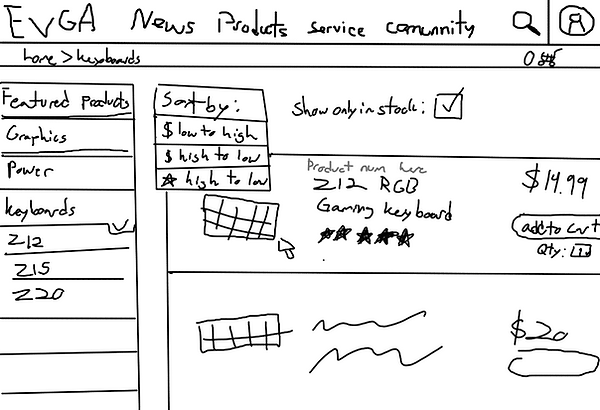

Zamzam Amir


Fares Ibrahim

3.2 The three design schemes (homepage)
Design one of the hompage

Design two of the hompage

Design three for the homepage

3.3 Rationale, assumptions about Hardware and Users
Rationale
1. Discuss the difference between the versions of the homepage?
Version 1: The design emphasizes menu element accessibility, with a static sidebar that remains in place as you browse down the homepage and a more prominently featured sales window.
Version 2: More emphasis is placed on community live streaming. It likewise features a stream in the center, with other components such as sales off to the side. The regular menus are tucked away in the corner behind a "hamburger" menu.
Version 3: The menus are more comparable to the original website, with the exception of a change in structure to aid navigation rather than distracting clients with an abundance of content.
2. Discuss which design you picked, and why you selected that one?
We chose version 1 because we loved the way the menu items in our design turned out. The nested and restructured menus make it clearer what everything is, and the static sidebar makes it easier to navigate from any place on the site without having to pause and scroll back to the top of the page.
3. Discuss what you learned from the contextual inquiry in Phase 2, and how that is reflected in your design?
We discovered that many users were having trouble navigating the site's menus due to an abundance of content that was too small to read comfortably and navigate with confidence. Our tiered menu sidebar, we hope, will be easier to read and navigate. People had problems finding things using the search tool since it previously directed them to a distinct portion of the site with connections to Amazon and other websites, which was confusing. The search bar will redirect to the product browsing tab with a filter for whatever the user typed in our final prototype.
4. Assumption about users:
-
Interested in computers.
-
Possibly interested in video games.
-
Familiar with using computers.
-
Age range 18-30s.
-
Likely college educated.
5. Assumption about the hardware:
-
Assumed 20-30 in.
-
Monitor with standard resolution.
-
Assumed color screen, as black and white computers are extremely rare nowadays.
3.4 Prototype /
3.5 Storyboard
-
perform a search to find a product
-
open the products tab
-
look for the keyboard category and click on it
-
click on the keyboard you want
-
read product information page
-
-
purchase a product for delivery
-
select the number of keyboards to add to cart (1)
add keyboard to cart -
go to checkout
-
"You are on the home page, please locate the keyboards"
"Now please select a keyboard"
"Finally, add that keyboard to your cart, please"